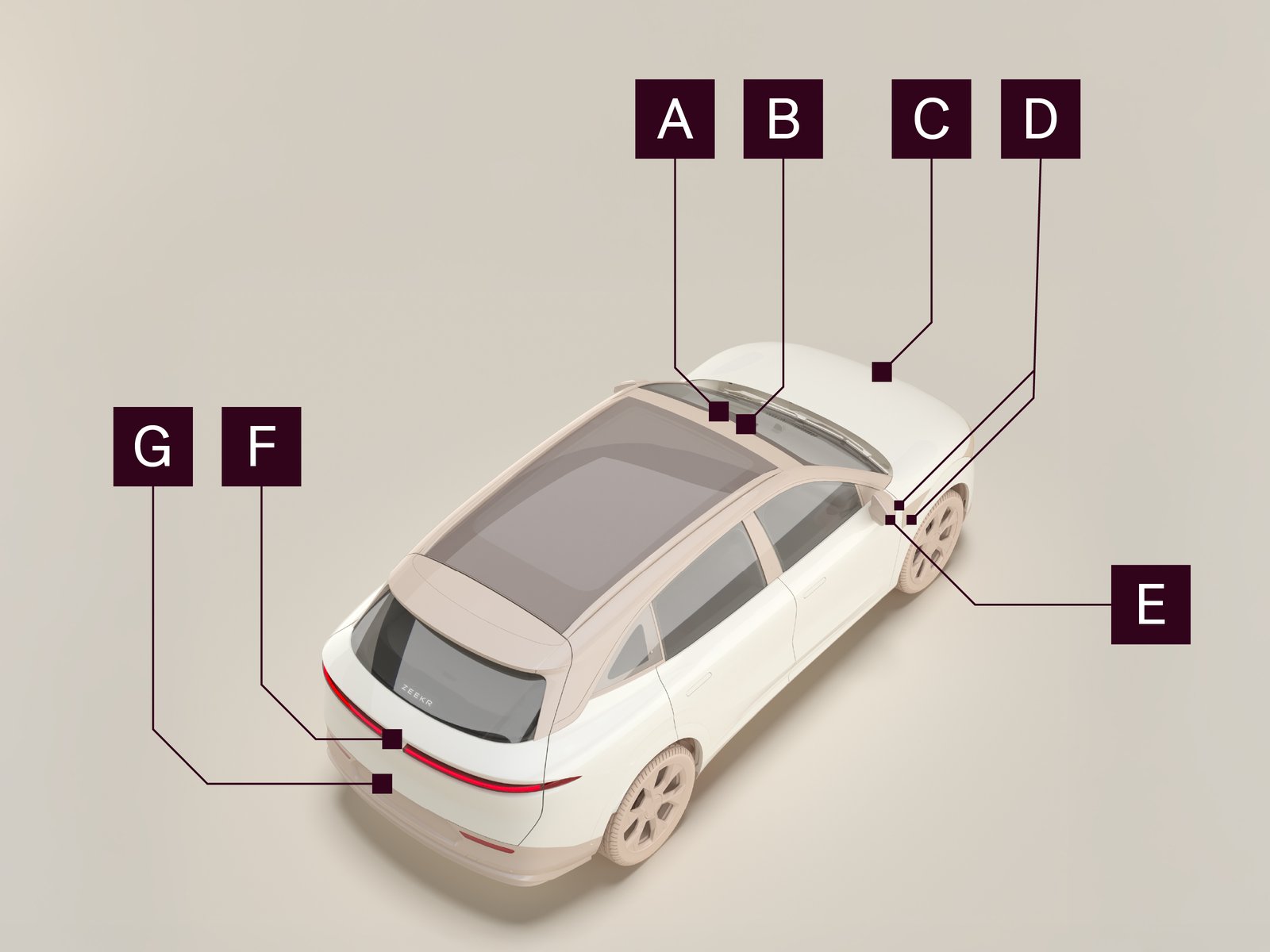
The driver assistance functions use the forward-facing radar and cameras to help the driver in various ways, including:
|
• |
Detecting the distance to other vehicles in front of the car |
|
• |
Detecting surrounding vehicles, pedestrians, and other objects |
|
• |
Identifying traffic signs |
Some parking functions rely on the ultrasonic sensors for information.
|
|
Forward-facing camera (wide view)
|
|
|
Forward-facing camera (narrow view)
|
|
|
Forward-facing radar and front-mounted parking camera
|
|
|
Side cameras
|
|
|
Parking cameras
|
|
|
Rear-facing camera
|
|
|
Rear-mounted parking camera
|
The car also has 12 ultrasonic sensors along the front and rear bumpers.
We recommend:
Regularly clean the areas around all the cameras, the forward-facing radar, and the ultrasonic sensors to ensure proper function of the driver assistance system.
Note: Always contact a Zeekr Hi-Tech Service Center or an approved service partner regarding servicing or replacing sensors.
Limitations of the driver assistance system sensors
Factors that might limit the assistance system sensors and cameras include:
|
• |
Accessories close to the front mounted sensor and the cameras |
|
• |
Damage to the sensors and cameras |
|
• |
Dirt or other obstructions on the sensors or cameras |
|
• |
Cracks or scratches on the bumpers in front of the cameras and sensors |
|
• |
Other radio devices or strong radar reflections |
|
• |
Certain steering wheel positions |
|
• |
Severe weather conditions with poor visibility |
|
• |
Strong sunlight, light reflections, standing water, ice, snow, dirt build-up, and faded lane markings on the road |
|
• |
Potholes, obstacles, and speedbumps |
|
• |
Tunnel entrances and exits |
|
• |
Narrow, winding, and undulating roads |
Very high temperatures in the passenger compartment might temporarily disable the windshield camera. The windshield camera automatically restarts and resumes working when the temperature decreases.
If a system sensor does not function, information is shown in the center display and/or the driver display:
|
• |
If a camera does not function, a message appears on the driver display indicating which camera is not functioning. Depending on the fault, more information might appear on the center display. |
|
• |
If an ultrasonic sensor does not function, an error message appears in the 360° camera interface and the notification center indicating if a front or rear sensor is faulty. |
If the user tries to activate a function relying on a faulty sensor, the function does not activate. A warning message appears on the driver display and/or center display indicating what the fault is.